Monday, December 19, 2016
Feature engineering tips for improving predictions..
Visit my blog posted on wordpress https://asimovweb.wordpress.com/2016/12/19/feature-engineering-tips-for-improving-predictions/


Thursday, October 6, 2016
Choose your best platform for machine learning
My new blog entry on choosing best platform for machine learning based solution...
https://asimovweb.wordpress.com/2016/10/06/choose-your-best-platform-for-machine-learning-solution/
Moving to wordpress blog
I have moved my blog to wordpress , Please continue to follow me at https://asimovweb.wordpress.com/
Sunday, May 1, 2016
Fast forward transformation process in data science with Apache Spark
Data Curation :
R Language - Widely adopted in data science with lot of supporting libraries
Mat lab - Commercial tool with lot of builtin libraries for data science
Apache Spark - New, powerful and gaining traction, Spark on Hadoop provides distributed and Resilient architecture help to fasten the curation process by multiple times.
Recent Study
Effective Utilization of resources:
Optimized transformation:
Integration to Hadoop Eco System
Support for multiple languages:
Curation is a critical process in data science that helps to prepare data for feature extraction to run with machine learning algorithms. Curation generally involves extracting, organising, integrating data from different sources. Curation may be a difficult and time consuming process depending on the complexity and volume of the data involved.
Most of the time data won't be readily available for feature extraction process, data may be hidden is unobstructed and complex data sources and has to undergo multiple transformational process before feature extraction .
Also when the volume of data is huge this will be a huge time consuming process and can be a bottle neck for the whole machine learning pipeline.
General Tools used in Data Science :One of my project involved curing and extracting the features from huge volume of data in natural language conversation text. We started with using R programming language for the transformation process, R language is simple with lot of functionalities in statistics and data science space but has limitations in terms of computation and memory and in turn efficiency and speed. We tried to migrate the transformation process to Apache Spark and observed tremendous improvement in the performance of transformation, We were able to bring down the time for transformation from more day to almost an hour of time for huge volume of data.
Here are some of the benefits that I would like to highlight the benefits of Apache Spark over R.
By default R runs in a single core and is limited by the capabilities of the single core and memory usage. Even though you have multi core system R is limited with using only one core, for memory it has the process limitations of a 32 bit R execution with virtual memory user space of 3 GB and for 64 bit R execution limited to amount of RAM. R has some parallel lib packages that can help to span the processing to multi cores.
Spark can run in distributed form with the processing running on executors with each executor running on its own process utilizing the cpu and memory.Spark brings the concept of RDD (Resilient Distributed Dataset) to achieve distributed , resilient and scalable processing solution.
Spark has the concept of Transformation and Actions where the transformation perform lazy evaluation of job execution until an Action task is being called and intern brings optimization when multiple transformations are involved before an Action task which leads to transferring the results back to the driver program
Spark integrates well in the Hadoop ecosystem with yarn architecture and can easily bind to HDFS , multiple NOSQL database like HBase, Cassandra etc.
Spark API's has support on multiple programming languages like Scala, Java and Python
Sunday, January 3, 2016
Google Auto Awesome Video - Is it a machine learning solution ???
Wish you all a very happy and a wonderful new year 2016 !!!
Happy to start the year with a blog covering some aspects on machine learning and this post is actually an inspiration from the new year eve celebration.
In the new year eve celebration with friends and I captured some photo moments using google photos app. The next day morning when I woke up I got a notification in mobile , would you like to review and save the video made out of photos in the new year eve event with some nice background music added, in google terms they call as Auto Awesome videos in google photos app.
I am happy to see the video that has been made automatically and ready to share , there is also a manual mode where we can customize photos for the video. But my interest is on the automatic creation and started thinking how this design could have been ?
At first cut I was able to sense this could potentially be a machine learning implementation and with my limited data science knowledge I thought to do provide some guess work on how this could have been designed while running at a large scale for millions of tenants at the server end
Let us understand the requirement in detail , given a collection of images we have to perform the following
Now let us analyse the type of machine learning solutions that could have potentially been used for this design
Disclaimer : This is purely my own guess work of the design and google might have done in a different way :)
Monday, December 7, 2015
NOSQL with RDBMS fallback:
NOSQL adoption becoming prominent across different critical applications to reap the benefits of performance, fault tolerance, high availability for bigger volume database needs. While migrating to NOSQL one of the risk that architects feel is what if the application gets into some unseen issues and take more time to fix , as NOSQL adoption is not battle tested across different domain and sectors and how to design some fallback strategy.
Few factors that people may think while migrating to NOSQL
Architects would like to design some fallback option as RDBMS where application can switch to RDBMS on unrecoverable NOSQL issues. This raises few questions in mind on how to design the same.
I can think of design depicted below to address the same.

Few components involved in the design are Apache Kafka receiving the updates and Apache Storm process the data to update the same to RDBMS. Both of these system are designed to work for big data needs in a reliable and distributed form.
Apache Kafka is a high performance message queuing system. Application pose the messages (Insert / Update / Delete) to Kafka message queue. To improve the performance with parallel processing the queue can be partitioned by table / region / logical data design as per the NOSQL model.
Apache Storm is a real time processing engine that can consume message through Spout component, do some processing through bolts and update the data to RDBMS. Storm has topologies to process guaranteed data processing, transactional mode of commitments that makes it suitable to handle partial failures and during commitments.
Benefits:
Wednesday, December 2, 2015
Next Generation Enterprise Application Architecture
New generation applications are architectured not only with the goal of desiging the application functionally and performing stable but also focuses on different aspects that are becoming critical
Scalability – Elastic scalability for all the layers of the application including data tier
Fault Tolerance - Ability to handle failure smartly and avoid cascading failures from and to dependent systems
High Availability – Ability to have application highly available on all layers including database even on data center failures
Efficient utilization of Infrastructure - Ability to scale up and down on demand
Faster access to underlying data on high load and data volumes
Ability to handle different data formats efficiently
Few reasons that are tied to this evolution are the need and benefits towards cloud adoption ( could be either private or public cloud ) and the need to handle huge data volume with faster response on the data tiers
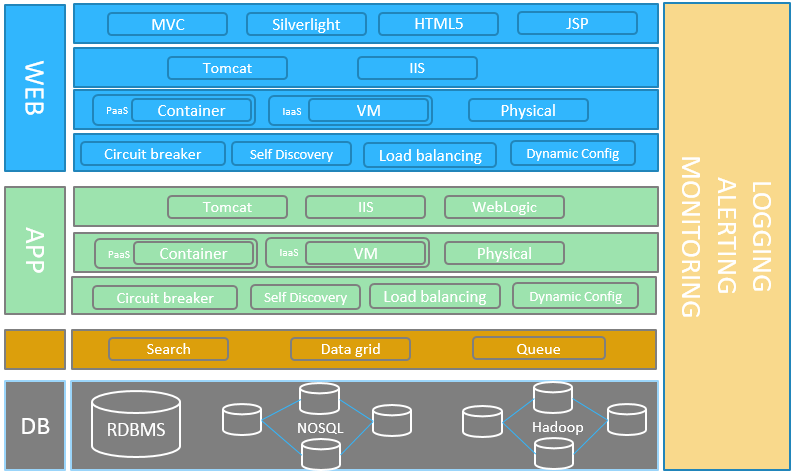
| Benefits | Solutions | |
|---|---|---|
| Physical -> IaaS -> PaaS | Elastic Scalability High Availability Efficient Infrastructure utilization Zero downtime deployment |
VMWare , Open Stack – Private Cloud IaaS AWS, Azure – Public Cloud IaaS , PaaS Cloud Foundry – PaaS on private and public cloud |
| Circuit Breaker | Fault Tolerance Better failure handling Avoid avalanche failures |
|
| Service Registry | Registry for dynamic instance scaling |
|
| Intelligent Load balancing | Intelligent Load Balancing utilizing the elastic scaling and self-discovery |
|
| Search | Quick search needs from huge data sets, full text search, pattern matching |
|
| Data Grid | Faster read write data, Reduce read / write overhead to database, high availability to data |
|
| Queue | Reliable data transfer across different data layers |
|
| NoSQL |
Big data – database needs Heavy Read / Write on high data volumes Faster response needs on the data High Availability on data Fault Tolerance on data Distributed database Scalable database |
|
| Hadoop |
Distributed file processing and storage ecosystem High speed batch (MapReduce) / real time ( Storm, Spark ) processing |
Different Hadoop distributions like Hortonworks, CloudEra,MapR |
Sunday, August 30, 2015
Kafka messaging system
Apache Kafka :
Kafka is an open source message queuing solution under Apache project, Kafka is new when compared to existing queue solutions like RabbitMQ, ActiveMQ, AWS SQS on product maturity but is quickly gaining momentum due to its features. In this post we will analyze some features of Kafka to see why it is gaining attention in the market.
The demand for processing huge data sets is growing everyday across enterprise systems and data is being processed in batch or real time and the queuing systems play an important role in connecting the data from source system / producer to destination / consumers. With huge dataset in transit enterprise are looking for message solution that can provide high throughput per second , scale horizontally, provides high availability and integrate well with other solutions.
Scalability:This is one of feature where Kafka gets edge over other solutions, the ability to scale horizontally, Kafka achieves it by means of partitioning. We can set the number of partition while defining a topic (queue) and these partitions will get distributed across the broker nodes in the cluster and hence when we want to scale the system we can add more broker nodes and hence the partitions get realigned across the added broker nodes.
Fault Tolerance and High Availability:Kafka achieves high availability by means of replication the partitions get replicated across different broker nodes and Kafka uses Zookeeper for its co-ordination. When a broker node goes down zookeeper co-ordinates so that the data is continued to be served from the replicated broker node partition and hence high availability for data is achieved.
Unit of Order:Kafka guarantees unit of order delivery at each partition level and messages posted across different partitions are not guaranteed to be in order.
Reliability & Guaranteed delivery:
Kafka provides reliability to the message delivery and has options of synchronous and asynchronous acknowledgements for the message delivery.
Integration with Big Data solutions:Kafka comes as part of Hadoop distributions and integrates with Hadoop map reduce for bulk consumption in parallel, for real time stream processing needs Kafka has good integration with systems like Apache Storm and Spark.
Reference : KafkaSaturday, August 15, 2015
Build your own monitoring solution for couch base
Recently i was trying to build a monitoring solution for couch base , i followed a simple approach that worked out well, thought to share the same in this post.
- Requirements for the solution
- Solution Needs
Solution Architecture

Solution Highlights
Friday, January 23, 2015
Two Phase Commit
Bottlenecks in database layer
Database has been seen as a most common place of bottleneck for performance across different tiers of the application. Few possible reasons restricting RDBMS performance
NoSQL on the rescue
I have mentioned about NoSQL data stores in my previous blog which achieves horizontally scalability distribution . In this blog I would like cover how transactional behaviour is achieved with high performance in NoSQL
Transactions in RDBMS
Let us try to understand how transactions operates in RDBMS,transactions with ACID (Atomicity, Consistency, Isolation and Durability) compliance executes all the actions involved in the transaction in a single step, if all the actions succeeds it commits the changes otherwise all the changes are revoked. To achieve this locking happens across the tables and hence performance becomes bottleneck
Let us take a simple transaction in order placement and analyse , An simple order management transaction involves two tables involving order and billing.
If payment succeeds, transaction as a whole has to be committed . If payment fails for some reason , change in product catalogue has to be revoked to original state so that it is available for others to consume. RDBMS achieves this whole process as a single step by locking these tables until transaction is completed and hence gets the ability to commit or revoke at the end of transaction, but this gives a overhead in performance as these tables gets locked and any read/ write on those are kept on hold unless stale read is enabled
Restrictions with NoSQL
Let us understand restrictions in NoSQL towards achieving this type of transactions
Two Phase Commit
Two Phase Commit is an approach followed in NoSQL to achieve transaction like behaviour. As the name mentions transactions happens in two phases with the ability to commit or revoke the changes made in phase 1 during phase 2. The approach introduces a additional component transaction manager which helps to commit or roll back the changes made in each phase of the transaction
Advantages with Two Phase Commit approach
My personal experience with Two Phase Commit
Recently I personally came to see a Two Phase Commit scenario handled in amazon for my order placement which became inspiration for this post.
I placed an order ( a laptop desk ) in Amazon where my order placement was received and I went for sleep.Looks the payment got failed for some reason. Next day morning I got a notification to retry my payment, in this case Amazon instead of revoking the order placed ,Amazon holded the order for additional time say for a day or two and provided option to retry payment failure.
My order confirmation

Payment retry for my order

I believe Amazon has implemented some form of two phase commit to achieve this, I was personally happy with the way amazon handled my payment failure as the order was not revoked and i was given retry option later to complete the order with my laptop desk was still reserved for me.
This also opens the door for other mode of payments like cash on delivery etc.
Few links on Two Phase Commit
Saturday, January 3, 2015
NoSQL - An Introduction
NoSQL:
 Polyglot persistence:
Data is not normalized.
Data will be duplicated.
Tables will be schema less and doesn’t follow a predefined pattern
Data can be stored in different formats like JSON, XML, audio, video etc.
Database may have some compromise on some attributes on ACID properties
Data may have some compromise on attributes like consistency.
CAP theorem:
 ACID Compliance:
 [Source: https://highlyscalable.wordpress.com/2012/03/01/NoSQL-data-modeling-techniques/]
NoSQL based on system architecture:
[Source: https://highlyscalable.wordpress.com/2012/03/01/NoSQL-data-modeling-techniques/]
NoSQL based on system architecture:
Data read / writes:
Not Only SQL often mentioned as NoSQL provides a mechanism to store and retrieve data not through tabular format as in relational databases.
There are different NoSQL solutions that are matured and being adopted widely Ex : Redis,Riak,HBase,Cassandra,Couchbase,MongoDB.
It is critical to understand the concepts of NoSQL why and how NoSQL has been used for a specific application architecture because every NoSQL solution is unique in its own way and different from general RDBMS solutions.
Need for NoSQL:With the explosion of web and social interactions the volume and complexity of data has grown tremendously huge, it is the need of the hour for each applications to scale seamlessly without any compromise in performance.
If we look at RDBMS performance starts degrading at some point of data volume and complexity and applications has to think adopting various NoSQL solutions to match the growth of huge volume and complexity.

NoSQL Solutions has become more matured and enterprise data architects has started implementing NoSQL in their solutions giving a strong message that RDBMS is not the only solution to data needs.
Problem in data persistence are unique and each problem needs specific solution to handle the scenario better. The concept of Polyglot persistence evolved to insist that application needs to use specific persistence solution to handle specific scenarios.
The table below helps to describe some scenarios in a retail web application and how different persistence solution can help to satisfy those needs.
| Scenario | Persistence solution | |
|---|---|---|
| User Sessions | Re-dis | |
| Financial data | RDBMS | |
| Shopping Cart | Riak | |
| Recommendations | Neo4j | |
| Product Catalog | MongoDB | |
| Analytics | Cassandra | |
| User Activity Logs | Cassandra |
[Source: http://martinfowler.com/bliki/PolyglotPersistence.html]
Coming out of relational mindset:One of the biggest problem with the adoption of NoSQL solution is to keep the people out of relational mindset. The minds of data modeling is deeply rooted with RDBMS and relational concepts.
It will be difficult initially to conceptualize data out of relational world, but if we understand these concepts and look back at our data solutions made, many of them may not need the normalized modeling.
CAP theorem defines set of basic attributes for any distributed system. Understanding the dimensions of CAP theorem helps to understand any NoSQL solution better. The below diagram describes the attributes satisfied by different distributed database system on multiple server deployment environment.
The important point to note here is that none of the distributed system can completely satisfy all the three dimensions of CAP theorem Consistency, Availability and Partition Tolerance.
Any distributed system can a maximum 2 dimensions of CAP completely, depending on the application requirement people have to choose for the specific distributed system that suits their needs.
It is critically important to understand the application requirements and understand where the specific NoSQL solution falls.

ACID stands for Atomicity, Consistency, Isolation, Durability, these are set of properties that guarantee transactional behavior in RDBMS operations.
RDBMS concepts that focuses more on integrity, concurrency, consistency and data validity, but many of the data needs in software applications may not be interested in these aggregation, integrity and validity or can handled in upper layers.
Compromising any of these in database architecture may bring high performance and scalability that RDBMS is currently lagging.
NoSQL database for example is not strictly ACID compliance where it can compromise on one of the attributes of ACID to achieve extreme scalability and performance.
It is critically important to understand the application requirements and understand the specific NoSQL used and how the compromise is made.
BASE versus ACID:NoSQL instead of adhering ACID compliance it tends to be BASE compliance in order to achieve scalability and high performance. The following are defined to be BASE attributes that NoSQL solution are trying to adopt
-
Basic Availability Soft-state Eventual consistency
NoSQL Categorization based on data modeling
- Key Value Stores Ex : Redis, Riak, Amazon Simple DB
- Column Family Stores ( Big Tables ) Ex : Cassandra , HBase
- Document databases Ex : CouchDB , Couchbase , MongoDB
- Graph databases Ex : Neo4j, Titan
Each of this NoSQL provide unique advantage on specific functionalities, selection of a specific NoSQL category is critical for the design of the application needs.
At high level the specific NoSQL solution can be chosen based on the complexity and querying associated with the data model.
The below diagram provides a good comparison on the different NoSQL databases.

Based on the system architecture, NoSQL can be categorized into the following.
- P2P ( Ring Topology )
- Master Slave
Each architecture has some pros and cons and a decision has to be made based on the needs.
| P2P ( Ring Topology ) | Master Slave | |||
|---|---|---|---|---|
| Role | All Nodes carries equal role | Master – Slave architecture with specific responsibilities on specific nodes | ||
| Consistency | Eventual | Strong | ||
| Write/Read | Read and Write happens through all the nodes | Mostly write is driven through restricted nodes | ||
| Availability | High Availability | Availability is little compensated when master / Write node fails | ||
| Data | Data is partitioned across all nodes with replication | Data is partitioned into multiple slave nodes with replication | ||
| Examples | Cassandra, Couch base | HBase, MongoDB |
The need of NoSQL type of solutions arrives when you tend to operate with huge volume of data and high requirements for performance towards read and writes.
Below are the typical use cases where NoSQL databases will be used
- Scalable databases
- High availability and fault tolerance
- Ever growing set of data
- Bulk read / write operations
Some NoSQL will be good for write intensive workloads and some are good for read intensive workloads and some are good for mixed workloads, specific analysis has to be done to decide on the NoSQL solution based on the needs.
Other important concepts that I would like to highlight specific to any NoSQL solutions:
Shrading:Shrading is one of the important concept in NoSQL solution by which the data is partitioned horizontally across different nodes in the cluster. This means the data is split based on some logic say some a hash code and spread across different nodes.
Replication:The data is not only partitioned by different nodes but also replicated across different cluster nodes. The replication factor will be a configuration in the solution. Replication ability gives high availability and automatic fail over when a specific node goes down.
Reference:
Thursday, May 2, 2013
Configuring Apache Hadoop Cluster in a standalone machine
Introduction
In this post I have tried to explain how to setup and configure Apache hadoop cluster with 2 or more nodes in a standalone machine probably ur windows laptop or desktop. This will help you to build map reduce program and run in a real cluster like environment and will help you to understand hadoop better.
Apache hadoop is a free open source software release for reliable and scalable distributed computing. It is a framework that allows for distributed processing large data sets across clusters of computers.
During this hadoop cluster setup, at high level the
following activities will be performed
v Creating base nodes for the cluster
v Setting up base operating system for the cluster
v Setup hadoop dependencies in the nodes
v Configure hadoop users ,access
v Setup authenticity across the cluster nodes
v Configure hadoop roles for the nodes
v Run hadoop daemons for each roles
v Browse for hadoop hdfs and job tracker sites
Creating base nodes
for the cluster:
If you are planning to try out this setup on your local windows laptop or desktop, download VMware player which is a free tool that can help you with setting up virtual machines with their local IP, so at the end you have a simple network of servers that can talk to each other. Nowadays laptop are coming with multiple cores and 4 GB of Memory, so it is easy to setup at least 3 nodes in your personal laptop or desktop.
Setup a Linux flavor
of OS in the base nodes:
On the base VM nodes you have set with VMware player, you can install a linux based OS with a ISO file, I choose ubuntu server as the OS, it is available free to download . Download the ISO and complete the VM creation with the VM Player.
Once the OS installation is done, you will be ended with a root or sudo user for the server. You can get the IP address of the servers by typing the command ifconfig , note down the IP addresses for the servers.
Setup Hadoop and its dependencies:
We have the servers setup with OS and a sudo user to operate on,now we can start setting up hadoop in the nodes.
Apache hadoop has the following dependencies
1. Java version 6 or higher
2. SSH
Download and set up in the server, I setup up JRE under a folder /opt/jre1.6.0_45 and set Java Home under ~/.bashrc , you can verify the setup by typing the command Java -version and check the version details displayed.
SSH can be installed by using the command - sudo apt-get install openssh-server
Verify SSH by executing the command SSH localhost to that machine itself.
Download a stable version of hadoop . I choose 1.0.X as the version to setup.
If you have downloaded the .tar.gz file you can use the command tar -zxvf {file.tar.gz} to unzip the contents. I have set it to the location /opt/hadoop-1.0.4 .
Configure Hadoop
We have hadoop and its dependencies set, we can now start configuring hadoop in that server, this involves the following activities
1. Create a new user , say hadoop, In Ubuntu I used the command Adduser #user
2. Add the sudo access to the user by editing /etc/sudoers file , this can be achieved by the following commands
a. sudo visudo
add the line in the file hadoop ALL=(ALL:ALL) ALL
3. Add full permission for this hadoop user to /opt/hadoop-1.0.4 where we have the hadoop binaries folder installed , this can be done by the following commands
a. Chown –R hadoop:hadoop
b. Chmod –R 777 hadoop-1.0.4
You have to repeat the above steps for all the nodes in the cluster or simply clone the virtual machines but make sure each virtual machine has got different IP Address. Consider you have created 3 nodes for this cluster.
Now we have 3 nodes created, we have to decide on the roles of the nodes considering one node to be master node playing roles of namenode and jobtracker and other nodes playing datanode and tasktracker, we can call the nodes as hdpMaster, hdpSlave1, hdpSlave2.
Configuring
authenticated SSH access between master and other nodes
We need to configure authenticated SSH access (password less) for hadoop user from masternode to rest of slavenodes. Perform the following steps to setup the same.
$ssh-keygen -t rsa ( generates the key file)
Copy the key file to all the slave machines
$scp .ssh/id_rsa.pub hadoop@192.168.8.129:~hadoop/.ssh/authorized_keys (Slave1)
$scp .ssh/id_rsa.pub hadoop@192.168.8.130:~hadoop/.ssh/authorized_keys (Slave2)
You should also able to ssh without password into the same, otherwise you have to do the following to do the same.
$ cat ~/.ssh/id_dsa.pub >> ~/.ssh/authorized_keys
Once the key is added to authorized keys of master, password less access to machines will be possible.
Verify whether you are able to connect using ssh to localhost and all the slaves by using ssh command
ssh localhost
ssh slave1IP
ssh slave2IP
HostEntry for the Server:
Update the host file with hostnames at etc/hosts , if you want to call the servers with hostnames
Configure hadoop roles for master and slaves:
We have all set for the hadoop to start, we are at the last step of configuring the roles for the nodes and start the cluster.
In the master node, perform the following steps
1. Go to the HadoopHome \ Conf location
2. Update hadoop-env.sh with JAVA_HOME location to the Java installation path
3.
Update core-site.xml to the following
4.
Update hdfs-site.xml to the following
5.
Update mapred-site.xml to the following
6. Update masters file with the masterhostname
7. Update slaves file with all slavehostname.
Repeat step 1 -4 to all the slave nodes.
Hadoop cluster is now configured for hdfs and mapreduce. We can start the corresponding daemons on the cluster
Step 1 : go to HadoopHome location
Step 2: Format namenode by running the command bin/hadoop namenode –format
Step 3: go to bin folder, Run namenode, datanode daemons , Run Jobtracker, tasktracker daemons

Option 1: Run ./start-all.sh in master node, this will start all the daemons in all the nodes cluster as configured in masters,slaves file
Option 2: Run ./start-dfs.sh in master node, this will start namenode and datanodes , Run ./start-mapred.sh , this will start jobtracker and tasktracker in the nodes.
Option 3:Run the following
In Master node
./hadoop-daemon.sh start namenode
./hadoop-daemon.sh start jobtracker
In Slaves node run
./hadoop-daemon.sh start datanode
./hadoop-daemon.sh start tasktracker
You can check the logs of the nodes or any errors during initialization under HadoopHome/logs in each of the nodes.

If everything went fine, you should be able to see the following sites for tracking hdfs and hadoop jobs
http://masternode:50070/dfshealth.jsp
- to track hdfs and its health
http://masternode:50030/jobtracker.jsp
- to track job running and its status
Reference : Apache hadoop cluster setup
Sunday, February 27, 2011
A2A 'Cloud Comparison' - Database as a Service
This is part of my series of articles on A2A Cloud Comparison. In my previous articles I was explaining my views of A2A Comparison with Compute and Storage. In this article I will provide my views on Database as a Service with Amazon and Azure.
Introduction
We all know how data is crucial to an application take an example whether it is a banking application or an online music store application, data is very important to the whole system. Say you have recently registered and created a user on a specific site and if the user identity is not found next time when you login to the site think how much hesitation will get and you will think twice before continuing to use the site. Think of what will happen if you lose some data in a critical financial application. Losing the data will incur heavy loss to the system or make the application really obsolete. The reason why I am talking about data criticality is because in this blog I am going to talk about the database as a service offering from the cloud computing providers.
When we talk about data most of the applications store their data in a database and managing the database will be a crucial task for the system. Database administration helps to manage the database and assures to keep the database updated and highly available. I want to list some to tasks performed as part of database administration
1. Patching the database software up to date
2. Taking backups of the database
3. Maintaining the backup for the specified retention period
4. Point in time recovery
Database as Service
What if all the database administration tasks have been taken care and have ability to scale the capacity with high availability and reliability? Database as a Service is the answer for that.
Amazon and Azure Offerings
Both Amazon and Azure provides offerings in the database as a service space and are differentiated in some ways. Amazon provides its offering as RDS (Relational Database as a Service) while Microsoft Azure provides its offering as SQL Azure.
Amazon operates RDS in Infrastructure as a Service space while Microsoft SQL Azure operates at Platform as a Service space, I will be explaining it in detail below. Following the general cloud pricing model this service will also be charged in a Pay as you use model.
RDS:
Amazon offering for Database as a service called RDS (Relational Database as a Service) provides database service for MYSQL database. Recently Amazon has made an announcement that will extend RDS for Oracle database, that means you will be able to create an Oracle database with all the setup ready in matter of minutes and you can able to create and delete the instances with hourly chargeback model and with all database administration tasks taken care..Sounds interesting?
Every RDS instance in Amazon will get a dedicated virtual server instance, database storages with all the data backup and retention policies configured, this is why I called RDS operating in Infrastructure as a Service space and because of its underlying virtualization model the instance can be migrated to a bigger server configuration if needed. Database servers can also be configured for Read replication or Multi Availability Zone deployment for high availability and Disaster Recovery.
Recently I have to validate the performance of Oracle database in a specific use case for a POC, for scenarios like this it will be difficult in non cloud model because Oracle software licenses will be charged for duration of a year at least and the licenses are Processor based or Socket based. It will be difficult to compromise with express edition or a single socket license as we have to validate performance scenario and now with cloud model it is easy to execute, create and use it for the period needed and release it when POC is done , as simple as that.
SQL Azure:
Microsoft offering for Database as a Service called SQL Azure provides service for SQL Server database. With SQL Azure we will be able to create databases for 1GB, 5GB up to a maximum of 50GB. We can create a smaller DB during creation and can later alter to a maximum of 50GB with all the database management tasks taken care operating in a pay as you use model.
Microsoft operates SQL Azure in a way bit different from Amazon RDS. Unlike RDS SQL Azure does not spare a dedicated virtual server for databases instead multiple SQL Azure databases will be hosted in a bigger SQL Server instance and will be operating more like a shared multi tenant environment with all the tenant specific security measures taken care, this architecture will be abstracted from the end user as the end user will be able to operate the database in a usual way and the user is assured with high availability and scalability.
One thing that has to take care in SQL Azure is that it can scale to a maximum of 50GB as of now and beyond that we have to plan for horizontal scaling of database in our application architecture.
References:
http://social.technet.microsoft.com/wiki/contents/articles/inside-sql-azure.aspx
http://aws.amazon.com/rds/
Introduction
We all know how data is crucial to an application take an example whether it is a banking application or an online music store application, data is very important to the whole system. Say you have recently registered and created a user on a specific site and if the user identity is not found next time when you login to the site think how much hesitation will get and you will think twice before continuing to use the site. Think of what will happen if you lose some data in a critical financial application. Losing the data will incur heavy loss to the system or make the application really obsolete. The reason why I am talking about data criticality is because in this blog I am going to talk about the database as a service offering from the cloud computing providers.
When we talk about data most of the applications store their data in a database and managing the database will be a crucial task for the system. Database administration helps to manage the database and assures to keep the database updated and highly available. I want to list some to tasks performed as part of database administration
1. Patching the database software up to date
2. Taking backups of the database
3. Maintaining the backup for the specified retention period
4. Point in time recovery
Database as Service
What if all the database administration tasks have been taken care and have ability to scale the capacity with high availability and reliability? Database as a Service is the answer for that.
Amazon and Azure Offerings
Both Amazon and Azure provides offerings in the database as a service space and are differentiated in some ways. Amazon provides its offering as RDS (Relational Database as a Service) while Microsoft Azure provides its offering as SQL Azure.
Amazon operates RDS in Infrastructure as a Service space while Microsoft SQL Azure operates at Platform as a Service space, I will be explaining it in detail below. Following the general cloud pricing model this service will also be charged in a Pay as you use model.
RDS:
Amazon offering for Database as a service called RDS (Relational Database as a Service) provides database service for MYSQL database. Recently Amazon has made an announcement that will extend RDS for Oracle database, that means you will be able to create an Oracle database with all the setup ready in matter of minutes and you can able to create and delete the instances with hourly chargeback model and with all database administration tasks taken care..Sounds interesting?
Every RDS instance in Amazon will get a dedicated virtual server instance, database storages with all the data backup and retention policies configured, this is why I called RDS operating in Infrastructure as a Service space and because of its underlying virtualization model the instance can be migrated to a bigger server configuration if needed. Database servers can also be configured for Read replication or Multi Availability Zone deployment for high availability and Disaster Recovery.
Recently I have to validate the performance of Oracle database in a specific use case for a POC, for scenarios like this it will be difficult in non cloud model because Oracle software licenses will be charged for duration of a year at least and the licenses are Processor based or Socket based. It will be difficult to compromise with express edition or a single socket license as we have to validate performance scenario and now with cloud model it is easy to execute, create and use it for the period needed and release it when POC is done , as simple as that.
SQL Azure:
Microsoft offering for Database as a Service called SQL Azure provides service for SQL Server database. With SQL Azure we will be able to create databases for 1GB, 5GB up to a maximum of 50GB. We can create a smaller DB during creation and can later alter to a maximum of 50GB with all the database management tasks taken care operating in a pay as you use model.
Microsoft operates SQL Azure in a way bit different from Amazon RDS. Unlike RDS SQL Azure does not spare a dedicated virtual server for databases instead multiple SQL Azure databases will be hosted in a bigger SQL Server instance and will be operating more like a shared multi tenant environment with all the tenant specific security measures taken care, this architecture will be abstracted from the end user as the end user will be able to operate the database in a usual way and the user is assured with high availability and scalability.
One thing that has to take care in SQL Azure is that it can scale to a maximum of 50GB as of now and beyond that we have to plan for horizontal scaling of database in our application architecture.
References:
http://social.technet.microsoft.com/wiki/contents/articles/inside-sql-azure.aspx
http://aws.amazon.com/rds/
Subscribe to:
Posts (Atom)